sábado, 9 de abril de 2011

Cómo se puede personalizar la página maestra de un sitio de Área de Reuniones (Meeting Workspace) para SharePoint 2010

Increíblemente este procedimiento tan sencillo esta poco documentado en la red y en SharePoint 2010 es mucho mas sencillo de lo que se puede estimar, gracias a nuestro amigo SharePoint Designer podemos realizar esta tarea fácil y rápidamente.

Para este procedimiento necesitaremos que tenga instalado SharePoint Designer en su computadora o en el servidor si esta planeando realizar las modificaciones desde allí.  Por si no lo sabe SharePoint Designer es Gratuito y puede bajarlo aquí (ojo con la versión de 64 o 32 bits que debe de seleccionar dependiendo donde lo va ejecutar).

En el sitio: Área de Reuniones debemos de seleccionar En Acciones del sitio y luego Editar en SharePoint Designer.

image

Luego seleccionar Páginas Principales (versión en español) o Master Page (versión en Inglés).

image

Luego seleccionar la página maestra MWSDefaultV4.master. Que es la página maestra para sitio de área de reuniones.

image

Importante: Algunas veces si se activo la característica o feature de Publicación utilizará la página v4.master.  (Si no surge ningún efecto la MWSDefaultV4.master intente con la V4.master)

Luego seleccione Editar Archivo o Edit File.

image

Luego a personalizar la página maestra, que para este ejemplo solo reemplazaremos la imagen predeterminada.

image

Para finalizar guarde los cambios realizados.

image

Luego mostrara una advertencia sobre los cambios realizados, solo presione el botón Si o Yes.

image

Cierre SharePoint Designer y sobre la página presione Ctrl+F5 para refrescar la página eliminado el cache de la misma y listo los cambios han sido efectuados.

image

Luego si necesita crear una plantilla solo vaya a configuración del sitio y seleccione la opción de Guardar el Sitio como plantilla con eso estará lista.

Bueno amigos espero les sirva y las haya ahorrado mucho tiempo en la red investigando este tema.

SharePoint4Fun!,

Manolo Herrera

viernes, 8 de abril de 2011

PerformancePoint Services is not configured correctly. Additional details have been logged for your administrator. PerformancePoint Services error code 20700.

Luego de desinstalar algunas soluciones de terceros y reiniciar el servidor de SharePoint 2010 de repente los elementos Web del Centro de Inteligencia de negocios reportan que no esta configurado correctamente el servicio de Performance Point.

Fui a revisar el Log de SharePoint y el detalle del error era el siguiente:

04/07/2011 16:45:52.09                w3wp.exe (0x121C)                                      0x1644  PerformancePoint Service                      PerformancePoint Services        ef8z       Critical  An exception occurred while rendering a Web control. The following diagnostic information might help to determine the cause of this problem:  Microsoft.PerformancePoint.Scorecards.BpmException: This action cannot complete because PerformancePoint Services is not configured correctly.  Additional details have been logged for your administrator.   PerformancePoint Services error code 20700.       24e6f2f7-7fe7-458a-84c8-c20d70799c1d

Luego de revisar la configuración de Performance Point, las cuentas de servicio, el proveedor de autenticación de la aplicación Web, el protocolo de Kerberos estaba funcionando correctamente, decidí que no había cambiado nada.

Entonces decidí reiniciar el servicio de Performance Point y listo con eso todo volvió a la normalidad.

Espero ahorrarle algún buen susto.

SharePoint4Fun,

Manolo Herrera

martes, 5 de abril de 2011

Longitud máxima de archivo, carpeta y url en SharePoint 2010

Es importante conocer las limitaciones propias de las tecnologías que utiliza SharePoint 2010 ya que esto nos ayudará a planificar de mejor forma los nombres que elegimos y la estructura que definimos para los archivos, carpetas y sitios dentro de SharePoint 2010

Microsoft en su artículo: URL path length restrictions (SharePoint Server 2010) , nos describe estas limitaciones propias de el manejo de url y nombres de archivo.

Para resumirles les indico lo siguiente:

Máximo tamaño de nombre de archivo o carpeta 128.

Máximo tamaño de URL completa sin incluir parámetros 260 caracteres.

Y el máximo tamaño de URL incluyendo parámetros varia en los navegadores entre el 7 y 8 podemos hablar entre 1024 a 2048 respectivamente.

Entonces debemos de planear efectivamente basado en el navegador que vamos a utilizar la estructura de sitios y sus nombres porque solo tenemos 260 caracteres como máximo y ya dentro de la librería podemos crecer hasta 2048 caracteres en total de la URL si utilizamos IE 8.  Por si no se ha dado cuenta cuando se define una carpeta o conjunto de ellas dentro de una librería de SharePoint estas van como parámetros y no son parte del URL Path.

Algo importante en esta planificación es utilizar lo menos posibles en el URL caracteres que agregan mas caracteres al ser codificados como espacios y estos otros !, ", #, $, %, &.

Así que ya lo sabe a planificar bien los nombres de archivos y carpetas y las estructuras de sus sitios

SharePoint4Fun,

Manolo Herrera

p.d.  Para idiomas como Japonés, Mandarín, Coreano y otros similares aplican mas restricciones que las mencionadas aquí, que no incluí por la audiencia en la que participo de habla hispana.

lunes, 4 de abril de 2011

Cómo corregir el error:[Microsoft.Office.Server.Search.WebControls.SearchTopologyView] from assembly [Microsoft.Office.Server.Search, Version=14.0.0.0, Culture=neutral, PublicKeyToken=71e9bce111e9429c]


Síntoma:

Luego de realizar una migración a SP 2010 o bien crear una instalación totalmente nueva este mensaje aparece y otros mas relacionados con elementos Web del Search.

[MissingWebPart] WebPart class [baf5274e-a800-8dc3-96d0-0003d9405663] is referenced [23] times in the database [SharePoint_AdminContent_e622dc7a-cd8b-4a12-8ba9-916a2d8cf8cd], but is not installed on the current farm. Please install any feature/solution which contains this web part. One or more web parts are referenced in the database [SharePoint_AdminContent_e622dc7a-cd8b-4a12-8ba9-916a2d8cf8cd], but are not installed on the current farm. Please install any feature or solution which contains these web parts.
[MissingWebPart] WebPart class [9eba9c17-3b89-a2e7-a3cf-0ee3d7c2adb1] (class [Microsoft.Office.Server.Search.WebControls.SearchTopologyView] from assembly [Microsoft.Office.Server.Search, Version=14.0.0.0, Culture=neutral, PublicKeyToken=71e9bce111e9429c]) is referenced [1] times in the database [SharePoint_AdminContent_e622dc7a-cd8b-4a12-8ba9-916a2d8cf8cd], but is not installed on the current farm. Please install any feature/solution which contains this web part. One or more web parts are referenced in the database [SharePoint_AdminContent_e622dc7a-cd8b-4a12-8ba9-916a2d8cf8cd], but are not installed on the current farm. Please install any feature or solution which contains these web parts.
[MissingWebPart] WebPart class [07f48b68-2e69-c86a-ebe4-16359e03ebc2] (class [Microsoft.Office.Server.Search.WebControls.AdvancedSearchBox] from assembly [Microsoft.Office.Server.Search, Version=14.0.0.0, Culture=neutral, PublicKeyToken=71e9bce111e9429c]) is referenced [1] times in the database [SharePoint_AdminContent_e622dc7a-cd8b-4a12-8ba9-916a2d8cf8cd], but is not installed on the current farm. Please install any feature/solution which contains this web part. One or more web parts are referenced in the database [SharePoint_AdminContent_e622dc7a-cd8b-4a12-8ba9-916a2d8cf8cd], but are not installed on the current farm. Please install any feature or solution which contains these web parts.
[MissingWebPart] WebPart class [23091f6c-295d-4493-504c-1714a20d65a2] (class [Microsoft.Office.Server.Search.WebControls.PeopleRefinementWebPart] from assembly [Microsoft.Office.Server.Search, Version=14.0.0.0, Culture=neutral, PublicKeyToken=71e9bce111e9429c]) is referenced [1] times in the database [SharePoint_AdminContent_e622dc7a-cd8b-4a12-8ba9-916a2d8cf8cd], but is not installed on the current farm. Please install any feature/solution which contains this web part. One or more web parts are referenced in the database [SharePoint_AdminContent_e622dc7a-cd8b-4a12-8ba9-916a2d8cf8cd], but are not installed on the current farm. Please install any feature or solution which contains these web parts.
[MissingWebPart] WebPart class [7d319bdd-d90e-7861-b7f0-2f9f4cec3004] (class [Microsoft.Office.Server.Search.WebControls.CoreResultsWebPart] from assembly [Microsoft.Office.Server.Search, Version=14.0.0.0, Culture=neutral, PublicKeyToken=71e9bce111e9429c]) is referenced [2] times in the database [SharePoint_AdminContent_e622dc7a-cd8b-4a12-8ba9-916a2d8cf8cd], but is not installed on the current farm. Please install any feature/solution which contains this web part. One or more web parts are referenced in the database [SharePoint_AdminContent_e622dc7a-cd8b-4a12-8ba9-916a2d8cf8cd], but are not installed on the current farm. Please install any feature or solution which contains these web parts.
[MissingWebPart] WebPart class [c744e2b2-158c-c2f8-2f80-54bf046ff644] (class [Microsoft.SharePoint.Portal.WebControls.PeopleSearchBoxEx] from assembly [Microsoft.SharePoint.Portal, Version=14.0.0.0, Culture=neutral, PublicKeyToken=71e9bce111e9429c]) is referenced [1] times in the database [SharePoint_AdminContent_e622dc7a-cd8b-4a12-8ba9-916a2d8cf8cd], but is not installed on the current farm. Please install any feature/solution which contains this web part. One or more web parts are referenced in the database [SharePoint_AdminContent_e622dc7a-cd8b-4a12-8ba9-916a2d8cf8cd], but are not installed on the current farm. Please install any feature or solution which contains these web parts.
[MissingWebPart] WebPart class [b36f9dfe-325a-1b44-e6bb-645dcf79c770] (class [Microsoft.Office.Server.Search.WebControls.FarmSystemStatus] from assembly [Microsoft.Office.Server.Search, Version=14.0.0.0, Culture=neutral, PublicKeyToken=71e9bce111e9429c]) is referenced [1] times in the database [SharePoint_AdminContent_e622dc7a-cd8b-4a12-8ba9-916a2d8cf8cd], but is not installed on the current farm. Please install any feature/solution which contains this web part. One or more web parts are referenced in the database [SharePoint_AdminContent_e622dc7a-cd8b-4a12-8ba9-916a2d8cf8cd], but are not installed on the current farm. Please install any feature or solution which contains these web parts.
[MissingWebPart] WebPart class [0a60f514-1dea-8537-b588-64ee5e224da3] (class [Microsoft.SharePoint.Portal.WebControls.SearchBoxEx] from assembly [Microsoft.Office.Server.Search, Version=14.0.0.0, Culture=neutral, PublicKeyToken=71e9bce111e9429c]) is referenced [2] times in the database [SharePoint_AdminContent_e622dc7a-cd8b-4a12-8ba9-916a2d8cf8cd], but is not installed on the current farm. Please install any feature/solution which contains this web part. One or more web parts are referenced in the database [SharePoint_AdminContent_e622dc7a-cd8b-4a12-8ba9-916a2d8cf8cd], but are not installed on the current farm. Please install any feature or solution which contains these web parts.
[MissingWebPart] WebPart class [9f56656f-6aa3-0d55-a812-711bf65864ea] is referenced [119] times in the database [SharePoint_AdminContent_e622dc7a-cd8b-4a12-8ba9-916a2d8cf8cd], but is not installed on the current farm. Please install any feature/solution which contains this web part. One or more web parts are referenced in the database [SharePoint_AdminContent_e622dc7a-cd8b-4a12-8ba9-916a2d8cf8cd], but are not installed on the current farm. Please install any feature or solution which contains these web parts.
[MissingWebPart] WebPart class [9637ed85-7d44-e135-35ba-73ce390ebf93] (class [Microsoft.Office.Server.Search.WebControls.SearchPagingWebPart] from assembly [Microsoft.Office.Server.Search, Version=14.0.0.0, Culture=neutral, PublicKeyToken=71e9bce111e9429c]) is referenced [2] times in the database [SharePoint_AdminContent_e622dc7a-cd8b-4a12-8ba9-916a2d8cf8cd], but is not installed on the current farm. Please install any feature/solution which contains this web part. One or more web parts are referenced in the database [SharePoint_AdminContent_e622dc7a-cd8b-4a12-8ba9-916a2d8cf8cd], but are not installed on the current farm. Please install any feature or solution which contains these web parts.
[MissingWebPart] WebPart class [2fc2e287-55c9-b5d1-0d5c-7458bc3c9841] (class [Microsoft.SharePoint.Portal.WebControls.ContactFieldControl] from assembly [Microsoft.SharePoint.Portal, Version=14.0.0.0, Culture=neutral, PublicKeyToken=71e9bce111e9429c]) is referenced [1] times in the database [SharePoint_AdminContent_e622dc7a-cd8b-4a12-8ba9-916a2d8cf8cd], but is not installed on the current farm. Please install any feature/solution which contains this web part. One or more web parts are referenced in the database [SharePoint_AdminContent_e622dc7a-cd8b-4a12-8ba9-916a2d8cf8cd], but are not installed on the current farm. Please install any feature or solution which contains these web parts.
[MissingWebPart] WebPart class [8acac35f-e9d3-95c3-76c7-76fe034cef50] (class [Microsoft.Office.Server.Search.WebControls.SearchSummaryWebPart] from assembly [Microsoft.Office.Server.Search, Version=14.0.0.0, Culture=neutral, PublicKeyToken=71e9bce111e9429c]) is referenced [1] times in the database [SharePoint_AdminContent_e622dc7a-cd8b-4a12-8ba9-916a2d8cf8cd], but is not installed on the current farm. Please install any feature/solution which contains this web part. One or more web parts are referenced in the database [SharePoint_AdminContent_e622dc7a-cd8b-4a12-8ba9-916a2d8cf8cd], but are not installed on the current farm. Please install any feature or solution which contains these web parts.
[MissingWebPart] WebPart class [926a1a3e-d1ff-f58f-8b3a-854974660703] (class [Microsoft.Office.Server.Search.WebControls.ContentSourcesStatus] from assembly [Microsoft.Office.Server.Search, Version=14.0.0.0, Culture=neutral, PublicKeyToken=71e9bce111e9429c]) is referenced [1] times in the database [SharePoint_AdminContent_e622dc7a-cd8b-4a12-8ba9-916a2d8cf8cd], but is not installed on the current farm. Please install any feature/solution which contains this web part. One or more web parts are referenced in the database [SharePoint_AdminContent_e622dc7a-cd8b-4a12-8ba9-916a2d8cf8cd], but are not installed on the current farm. Please install any feature or solution which contains these web parts.
[MissingWebPart] WebPart class [f9c020f4-bcb2-3629-0460-9e5ec4c9de93] (class [Microsoft.Office.Server.Search.WebControls.QuerySuggestionsWebPart] from assembly [Microsoft.Office.Server.Search, Version=14.0.0.0, Culture=neutral, PublicKeyToken=71e9bce111e9429c]) is referenced [1] times in the database [SharePoint_AdminContent_e622dc7a-cd8b-4a12-8ba9-916a2d8cf8cd], but is not installed on the current farm. Please install any feature/solution which contains this web part. One or more web parts are referenced in the database [SharePoint_AdminContent_e622dc7a-cd8b-4a12-8ba9-916a2d8cf8cd], but are not installed on the current farm. Please install any feature or solution which contains these web parts.
[MissingWebPart] WebPart class [de8c8afc-7c6e-e9fc-91c2-aa4a291c3623] (class [Microsoft.Office.Server.Search.WebControls.SearchApplicationSystemStatus] from assembly [Microsoft.Office.Server.Search, Version=14.0.0.0, Culture=neutral, PublicKeyToken=71e9bce111e9429c]) is referenced [1] times in the database [SharePoint_AdminContent_e622dc7a-cd8b-4a12-8ba9-916a2d8cf8cd], but is not installed on the current farm. Please install any feature/solution which contains this web part. One or more web parts are referenced in the database [SharePoint_AdminContent_e622dc7a-cd8b-4a12-8ba9-916a2d8cf8cd], but are not installed on the current farm. Please install any feature or solution which contains these web parts.
[MissingWebPart] WebPart class [bc8768f7-7d8c-1d56-b5a5-bb19cca9c7b8] (class [Microsoft.Office.Server.Search.WebControls.FederatedResultsWebPart] from assembly [Microsoft.Office.Server.Search, Version=14.0.0.0, Culture=neutral, PublicKeyToken=71e9bce111e9429c]) is referenced [1] times in the database [SharePoint_AdminContent_e622dc7a-cd8b-4a12-8ba9-916a2d8cf8cd], but is not installed on the current farm. Please install any feature/solution which contains this web part. One or more web parts are referenced in the database [SharePoint_AdminContent_e622dc7a-cd8b-4a12-8ba9-916a2d8cf8cd], but are not installed on the current farm. Please install any feature or solution which contains these web parts.
[MissingWebPart] WebPart class [83d7efb5-5a0a-0d4e-fc32-cf0eae4b6cb1] (class [Microsoft.Office.Server.Search.WebControls.SearchStatsWebPart] from assembly [Microsoft.Office.Server.Search, Version=14.0.0.0, Culture=neutral, PublicKeyToken=71e9bce111e9429c]) is referenced [2] times in the database [SharePoint_AdminContent_e622dc7a-cd8b-4a12-8ba9-916a2d8cf8cd], but is not installed on the current farm. Please install any feature/solution which contains this web part. One or more web parts are referenced in the database [SharePoint_AdminContent_e622dc7a-cd8b-4a12-8ba9-916a2d8cf8cd], but are not installed on the current farm. Please install any feature or solution which contains these web parts.
[MissingWebPart] WebPart class [42b6d12b-947f-6ec4-9540-dc2f3e8f2425] (class [Microsoft.Office.Server.Search.WebControls.PeopleCoreResultsWebPart] from assembly [Microsoft.Office.Server.Search, Version=14.0.0.0, Culture=neutral, PublicKeyToken=71e9bce111e9429c]) is referenced [2] times in the database [SharePoint_AdminContent_e622dc7a-cd8b-4a12-8ba9-916a2d8cf8cd], but is not installed on the current farm. Please install any feature/solution which contains this web part. One or more web parts are referenced in the database [SharePoint_AdminContent_e622dc7a-cd8b-4a12-8ba9-916a2d8cf8cd], but are not installed on the current farm. Please install any feature or solution which contains these web parts.
[MissingWebPart] WebPart class [3517e131-b02d-114b-1df2-dd9fa67b90c6] (class [Microsoft.Office.Server.Search.WebControls.TopFederatedResultsWebPart] from assembly [Microsoft.Office.Server.Search, Version=14.0.0.0, Culture=neutral, PublicKeyToken=71e9bce111e9429c]) is referenced [1] times in the database [SharePoint_AdminContent_e622dc7a-cd8b-4a12-8ba9-916a2d8cf8cd], but is not installed on the current farm. Please install any feature/solution which contains this web part. One or more web parts are referenced in the database [SharePoint_AdminContent_e622dc7a-cd8b-4a12-8ba9-916a2d8cf8cd], but are not installed on the current farm. Please install any feature or solution which contains these web parts.
[MissingWebPart] WebPart class [d46a22f8-7373-12cb-4e07-e1b78e3dba96] (class [Microsoft.Office.Server.Search.WebControls.RefinementWebPart] from assembly [Microsoft.Office.Server.Search, Version=14.0.0.0, Culture=neutral, PublicKeyToken=71e9bce111e9429c]) is referenced [1] times in the database [SharePoint_AdminContent_e622dc7a-cd8b-4a12-8ba9-916a2d8cf8cd], but is not installed on the current farm. Please install any feature/solution which contains this web part. One or more web parts are referenced in the database [SharePoint_AdminContent_e622dc7a-cd8b-4a12-8ba9-916a2d8cf8cd], but are not installed on the current farm. Please install any feature or solution which contains these web parts.
[MissingWebPart] WebPart class [5cc5df3a-29a8-a713-5898-e52e2dce72a8] (class [Microsoft.Office.Server.Search.WebControls.SearchApplicationShortcutsList] from assembly [Microsoft.Office.Server.Search, Version=14.0.0.0, Culture=neutral, PublicKeyToken=71e9bce111e9429c]) is referenced [1] times in the database [SharePoint_AdminContent_e622dc7a-cd8b-4a12-8ba9-916a2d8cf8cd], but is not installed on the current farm. Please install any feature/solution which contains this web part. One or more web parts are referenced in the database [SharePoint_AdminContent_e622dc7a-cd8b-4a12-8ba9-916a2d8cf8cd], but are not installed on the current farm. Please install any feature or solution which contains these web parts.
[MissingWebPart] WebPart class [874f5460-71f9-fecc-e894-e7e858d9713e] is referenced [71] times in the database [SharePoint_AdminContent_e622dc7a-cd8b-4a12-8ba9-916a2d8cf8cd], but is not installed on the current farm. Please install any feature/solution which contains this web part. One or more web parts are referenced in the database [SharePoint_AdminContent_e622dc7a-cd8b-4a12-8ba9-916a2d8cf8cd], but are not installed on the current farm. Please install any feature or solution which contains these web parts.
[MissingWebPart] WebPart class [ff79cbb5-48cf-96ee-3f74-f22cc1b00fbd] (class [Microsoft.Office.Server.Search.WebControls.FarmSearchApplicationList] from assembly [Microsoft.Office.Server.Search, Version=14.0.0.0, Culture=neutral, PublicKeyToken=71e9bce111e9429c]) is referenced [1] times in the database [SharePoint_AdminContent_e622dc7a-cd8b-4a12-8ba9-916a2d8cf8cd], but is not installed on the current farm. Please install any feature/solution which contains this web part. One or more web parts are referenced in the database [SharePoint_AdminContent_e622dc7a-cd8b-4a12-8ba9-916a2d8cf8cd], but are not installed on the current farm. Please install any feature or solution which contains these web parts.
[MissingWebPart] WebPart class [0ff9a0d5-1514-7a3b-fb97-fccbc902e380] (class [Microsoft.Office.Server.Search.WebControls.HighConfidenceWebPart] from assembly [Microsoft.Office.Server.Search, Version=14.0.0.0, Culture=neutral, PublicKeyToken=71e9bce111e9429c]) is referenced [1] times in the database [SharePoint_AdminContent_e622dc7a-cd8b-4a12-8ba9-916a2d8cf8cd], but is not installed on the current farm. Please install any feature/solution which contains this web part. One or more web parts are referenced in the database [SharePoint_AdminContent_e622dc7a-cd8b-4a12-8ba9-916a2d8cf8cd], but are not installed on the current farm. Please install any feature or solution which contains these web parts.

Solución:

Así como surgieron a si se van.  Active a nivel de la colección de sitios del Central Administration la “feature” Elementos web de Serach Server y este error desaparecerá.

image

Para verificar de inmediato esto solo debe de ir al analizador de salud de nuevo buscar el error y ejecutar la opción realizar ahora.

image

SharePoint4Fun!,

Manolo Herrera

viernes, 1 de abril de 2011

SharePoint 2010:Sabías qué cada sitio personal es realmente una colección de sitios?

SharePoint legendariamente desde la versión 2007 tiene la capacidad de crear un sitio personal para cada usuario dentro del portal es una opción que puede o no habilitarse.  Pero aunque uno piensa en un Sitio como tal, en realidad es una colección de sitios esto quiere decir que puede ser totalmente privado y ajeno al portal en general ya que una colección de sitios define una frontera de usuarios, grupos, permisos e inclusive funcionalidades.

Si te has puesto a revisar estos “sitios” personales verás que no tienes disponibles todos los elementos Web del portal ya que este “sitio” esta basado en una plantilla de sitios diseñada para usuarios individuales con cierto nivel de colaboración.

Supongamos un escenario donde tienes un portal con 10,000 usuarios entonces deberás planear tener 10,000 colecciones de sitios dentro de la base de datos de Mis Sitios o My Sites.

Porque esto es importante, según la recomendación de Microsoft en la capacidad por colecciones de sitios por base de datos de contenido es 5,000 y recomendado 2,000. No quiere decir que es el tope pero como explican es que por rendimiento y por el espacio ocupado este valor puede variar y afectará claramente el rendimiento.

Para conocer mas sobre las capacidades de SharePoint 2010 consulte la siguiente dirección: http://technet.microsoft.com/en-us/library/cc262787.aspx#SiteCollection

SharePoint4Fun!,

Manolo Herrera

lunes, 21 de marzo de 2011

Carrera de relevos o Configuración de Kerberos en SharePoint 2010


El presente artículo es un resumen de la Guía para configurar Kerberos provista por Microsoft para SharePoint 2010, no pretende reemplazarlo sino dar un panorama general y una comprensión de lo que se va hacer. El detalle de cada paso esta en la guía en la siguiente dirección:

http://www.microsoft.com/downloads/en/details.aspx?FamilyID=1a794fb5-77d0-475c-8738-ea04d3de1147&displaylang=en

Antes de configurar Kerberos hay que comprender como funciona y se integra con los diferentes servicios.

Kerberos es un protocolo de seguridad que soporta autenticación por etiquetado.

Este protocolo de seguridad es necesario en SharePoint 2010 cuando deseamos conectarnos a una fuente de datos externa y se requiere pasar las credenciales del usuario que se conecto al portal.  Para que comprendamos mejor veamos el siguiente diagrama:

image

Como vemos en la figura de arriba la credenciales son almacenadas en SharePoint como un Claim, es entonces necesario convertirlas de nuevo en un Tiquete de Kerberos, para autenticarse con un sistema externo.

Kerberos se asocia a una o varias cuentas de dominio y a un servicio para su utilización.  Esto se hace a través de crear un SPN o Service Principal Name, en línea de comando en un servidor con Windows Server 2008 que no sea el Controlador de dominio, como se muestra a continuación:

SetSPN –S HTTP/Portal [cuenta de dominio]

También es necesario la delegación de una cuenta o otra para transferir el Tiquete que lleva las credenciales del usuario.  Como lo muestra la imagen de abajo.

image

La delegación la hacemos a través del Directorio Activo.  Para las cuentas que se le asociaron el SPN, en el Directorio Activo sobre las propiedades de la cuenta aparecerá una pestaña llamada Delegation, en ella nos permitirá seleccionar que servicios estarán asociados a la cuenta.

image

En SharePoint como primer paso es habilitar el protocolo de Kerberos para al autenticarse al portal genere dicho Tiquete.

image

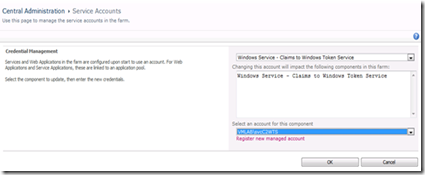
Luego deberá registrarse las cuentas que tienen generado el SPN como una cuenta administrada (un concepto viejo en SharePoint pero que toma relevancia en 2010) y luego asociar esta cuenta a un servicio de SharePoint que utilizará el tiquete generado para autenticar o pasar las credenciales del usuario.
image

Hay ciertos servicios asociados a SharePoint que utilizan Basic Kerberos Delegation otros Kerberos constrained delegation. La regla es que si se puede pasar de una basic delegation a una constrarined pero no a la inversa.  Los servicios que requieren Kerberos son constrained delegation son:

· Excel Services

· PerformancePoint Services

· InfoPath Forms Services

· Visio Services

Los que requieren Basic Kerberos delegation son:

· Business Data Connectivity service and Microsoft Business Connectivity Services

· Access Services

· Microsoft SQL Server Reporting Services (SSRS)

· Microsoft Project Server 2010

La diferencia importante entre estos dos sistemas de delegación en la intervención de un Servicio llamada C2WTS o Claims to Windows Token Service. La imagen de abajo muestra claramente lo que debería de suceder.

image

En resumen debemos de configurar Kerberos para:

1. Autenticarnos al portal.

2. Para pasar el Tiquete al Servicio C2WTS.

3. Para el servicio de SharePoint que requiere y pasará las credenciales por ejemplo Performance Point o Excel Services.

4. A la cuenta que inicia el servicio de la fuente de datos externa, por ejemplo SQL Server 2008 R2 Analysis Services o bien Database Engine o ambos.

Para ello debe crearse estas cuentas de Windows asociar el SPN a las mismas, delegarlo a través de Active Directory, configurar SharePoint y configurar las cuentas y asociarlas a los servicios requeridos.

Sugerencia vaya probando como lo sugiere la guía cada paso para asegurarse que ha hecho el procedimiento correcto.  Hay ocasiones que Kerberos no autentica luego de recién configurar un servicio, a veces registrando de nuevo la cuenta asociada al servicio y reiniciándolo hace que funciona o bien como ultimo recurso reiniciar el servidor de SharePoint o del servidor donde se esta configurando la cuenta que deseamos que utilice Kerberos.

Otros aspectos a tomar en cuenta: http://technet.microsoft.com/en-us/library/gg502599.aspx

Y otro buen artículo sobre Kerberos y SharePoint es: http://technet.microsoft.com/en-us/magazine/ee914605.aspx

SharePoint4Fun,

Manolo Herrera

jueves, 10 de marzo de 2011

Comentarios sobre la integración de Reporting Services y SharePoint 2010

Las opciones para integrar SharePoint 2010 y Reporting Services dependen de la configuración de los servidores, la mas sencilla que no requiere mayor intervención en la de un solo servidor, pero cuando hablamos de más de uno hay variadas configuraciones.

Me llamó la atención la configuración de 2 servidores que es una de las instalaciones mas comunes en nuestros clientes.  Que hay 2 variantes les muestro la imagen de abajo:

Bb677365_Rs_sharepointRScompdesc_multiple2srv_example2(en-us,SQL_105)

Imagen obtenida de technet

Con esta configuración debes de instalar SharePoint en ambos servidores.  Configurar primero la granja y luego instalar SharePoint en el servidor de bases de datos ya que Report Server necesita el modelo de objetos de SharePoint a la mano. 

Al ejecutar el asistente de SharePoint 2010 debes de indicar que te vas a conectar a una granja existente y no necesitas el Central Administration.  Si ya lo instalaste aunque no te afecta te recomiendo que lo desinstales porque no lo vas a utilizar, para ello debes de ejecutar de nuevo el asistente de SharePoint e indicarle que quieres seguir conectado a la granja pero que no quieres hospedar el Central Administration en esta computadora.

La segunda configuración fue la que me llamo la atención, se las muestro a continuación:

Bb677365_sharepointRScompdesc_multiple(en-us,SQL_105)

Imagen obtenida de technet

En esta no instalas Reporting Services en el servidor de bases de datos, sino en el Front End o Servidor de Cara y entonces no necesitas instalar SharePoint 2010 en el servidor de bases de datos ya que el que necesita el MO de SharePoint es el Report Server.

En cuanto a licenciamiento dependiendo de la versión de Sql server utilizada en el servidor de bases de datos y de SharePoint en el servidor de Front End que estés utilizando te convendrá una o la otra.  Ya que SharePoint 2010 bajo sus precios en el core pero aumento el valor en Calls y el valor del Core de Sql Server 2008 R2 Enterprise es bastante mas caro que el de SharePoint 2010 Core Enterprise, así que debes de jugar con tus versiones y números y ver que te conviene mas.  Debes de solicitar a un proveedor autorizado de Microsoft los precios porque no son públicos y puedes obtener información incorrecta en la red.

SharePoint4Fun!,

Manolo Herrera